
Agent Kanban Boards vs Terminal Dashboards
Agent Kanban Boards vs Terminal Dashboards. Kanban boards optimize for workflow state across time — where tasks sit in a pipeline, what is blocked, what ships next — while terminal dashboards optimize for live process truth — what each agent is emitting right now, which pane is prompting, whether the run is healthy. For coding-agent fleets you generally want both doing different jobs: the board answers “what should we do next,” the terminal answers “what is happening this second” (session badges like Ferryx’s are the terminal-native projection of that live state) — and each view fails informatively when asked the other’s question.
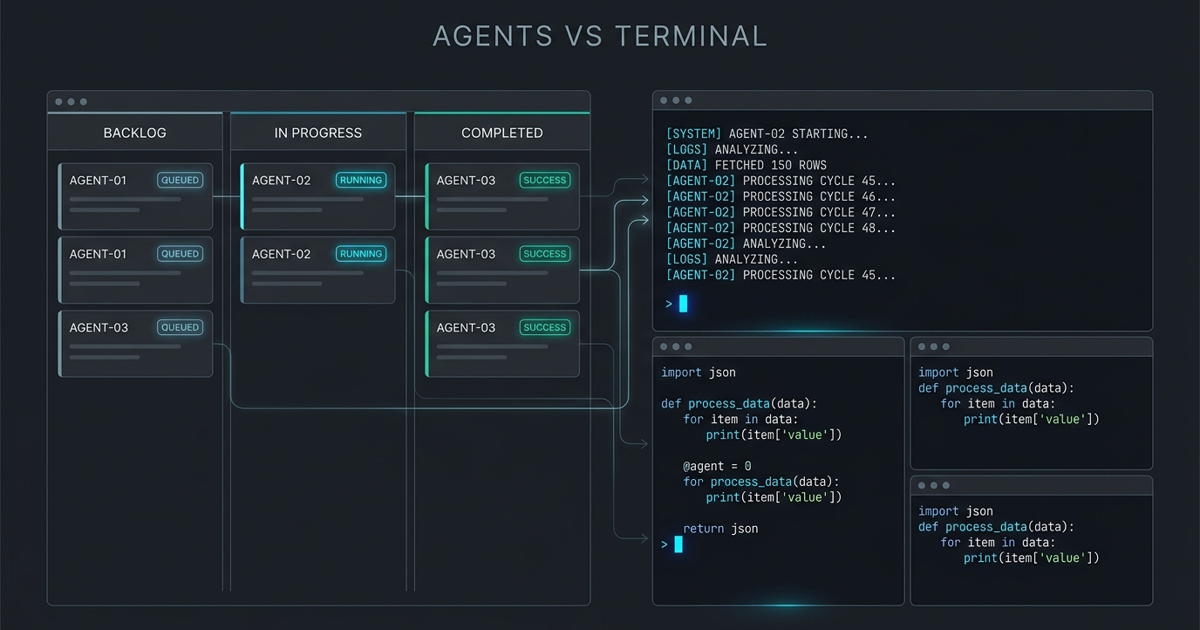
What each view optimizes
Kanban boards are pull-system instruments. Their native vocabulary — columns like backlog/ready/running/review/done, cards with owners and estimates, WIP limits per column — encodes flow: where work is queuing, what is starved, what is blocking the next stage. Transitions are events a human (or agent) deliberately commits: a card moves when its state actually changes, so the board’s honesty depends on the mover. For agent fleets, boards typically track tasks (the unit a worker was assigned) rather than processes: a card in “running” means “an agent owns this,” abstracted from which machine, which worktree, which spinner.
Boards also carry planning affordances terminals do not: WIP limits make over-parallelization visible as a column overflowing rather than as a feeling; aging cards surface stalled work; swimlanes slice by owner or epic. These are the instruments a lead reads — and the reason boards appear in every agent-orchestration toolkit regardless of implementation.
Terminal dashboards are live-signal instruments. A TUI (or pane grid) rendering per-agent status lines, recent output tails, prompt indicators, CPU/wheel spinners — its vocabulary is process: alive, wedged, prompting, spinning, exited-with-code. Transitions are observed, not committed: the dashboard does not believe a run is healthy because someone said so; it believes what the process’s stdout and heartbeat say now. For fleets this is the difference between tracking intentions and tracking reality — an agent stuck in a tool-call loop is “running” on any board and visibly thrashing on a dashboard.
Dashboards also give you the input side: pane focus, keystroke injection, scrollback — where a board only shows state, a terminal dashboard lets you act on it in the same surface. That coupling of see-and-do is why operators who live in terminals resist migrating status to a browser tab: the context switch to “check the board” costs the focus the terminal kept.
Where boards hide terminal truth
Ask a board “is this agent healthy?” and it answers a different question well: “does a card say work is proceeding?” Four gap patterns recur:
- Zombie cards. The agent crashed an hour ago; nobody moved the card because moving cards is manual. The board’s
runningcolumn is now fiction, and anyone planning from it plans on ghosts. Boards degrade by omission of updates; dashboards degrade by noise — noisier failure, easier to trust. - Prompt invisibility. An agent parked on a permission dialog and an agent mid-refactor both keep the card in
running. The blocked state that most needs a human (attention economics: parked agents cost the fleet) has no native board representation unless a detector writes it — and most board integrations only hear “task started/finished.” - Granularity mismatch. One card = one task, but failures live inside tasks: a worker three tool-calls into a bad path still shows one card. Drilling to the truth means leaving the board for the terminal anyway — the board answered “not done yet,” which you already knew.
- Latency of translation. Even with automated updates, board state is a summary pipeline (detect → map to column → render): each hop adds lag and mapping judgment. During an incident — exactly when you are reading the screen — you want the raw signal, not its press secretary.
The honest division: boards answer planning questions (what is queued, what is next, what is blocked long-term), and they answer them with stale-but-structured data. That is a feature for planning and a liability for operations.
Combining board and pane
The pattern that works treats the two views as layers over one state model, not as competing UIs:
- One state source, two projections. The fleet register (task status, owner, blocked-reason, session identity) is the single truth; the board renders columns from it, the terminal dashboard renders live signals into it. When the dashboard sees a prompt-detector fire, the register flips the task to
blocked— and the board’s column updates in the same move. Divergence becomes impossible because there is one write path. - Card ↔ pane binding in both directions. Every card carries its session/worktree identity; every dashboard pane shows its task’s card ID. Click-to-attach (board → terminal) and annotate-from-pane (dashboard → card note) keep the planning surface and the doing surface navigable without re-keying context.
- Route the question to the right view by habit. “What should we pick up next?” → board. “Is anything on fire right now?” → dashboard. “Why is this card stuck?” → dashboard first (live truth), then board (history). Teams that codify this routing stop arguing about which tool is better and start reading each for what it is good at.
- Blocked-state detection is the integration keystone. The one signal both views need most — parked-on-approval — is provider-specific and must be detected at the terminal layer (per-CLI prompt detectors), then published to the register. Get that one detector right and the board’s blocked column becomes trustworthy; skip it and both views lie in the same direction.
Ferryx’s session badges form the terminal-side projection of exactly this register — state over panes, not scrollback archaeology — which the attention inbox design motivates and the orchestration dashboard post shows as a composite; the worktree mechanics backing each pane’s identity are in the parallel agents use case.
FAQ
Should agent tasks live on a real Kanban tool (Jira, Linear) or in the terminal?
If humans plan, review, and sequence the work — yes, keep tasks in the team’s real board (where planning rituals already live) and sync only state transitions (started/blocked/done) plus the terminal identity link. If the loop is fully agent-internal (leader dispatching workers with no human planning step), an in-repo status file keeps the register co-located with the work; export to the real board at review time rather than making every state write a cross-system hop.
How is an agent dashboard different from just tailing each agent’s output?
Tail shows emissions; dashboard shows state derived from emissions — prompt-detected, heartbeat-checked, exit-coded, and compared against expected liveness. The difference shows during an incident: ten tails require ten interpretations (“is this loop normal?”), one dashboard line says blocked 4m or thrashing once and lets you act. The derivation rules — what counts as healthy vs parked vs wedged — are the dashboard’s real content, not its rendering.
What WIP limit applies to coding agents?
WIP limits for agents should be set by your approval and review bandwidth, not by compute: each additional concurrent run adds expected interventions (prompts, escalations, merge reviews), and past the point where interventions queue up, extra runs idle waiting for you anyway — burning tokens to accumulate a backlog. Start with a limit equal to how many blocked-agent questions you can answer per hour without breaking focus, and let the board’s overflowing column argue the case for raising it.
Can one tool do both views well?
Purpose-built terminal workspaces can carry board-like state (columns as status groups, cards as badges with task metadata) while keeping pane-native live truth — covering the combination pattern natively instead of via sync. What no single view replaces is the planning affordances of a real board (backlogs, sprints, cross-team visibility); the practical architecture for most teams remains “team board for planning + terminal register for operation,” stitched by the single-state-source rule above.